
TL;DR tmux since 2016, and the reason is that it’s flexible. My config grew into 1,495 lines of zsh across 13 scripts over those years, one script at a time, and the status bar alone was burning 15.4% of a core on battery. I rewrote the lot as one Rust daemon, tmux-companion. The bar costs 1.8% now.
I’ve been using tmux since somewhere in 2016 and I’ve never seriously tried to leave.
People usually sell it on the detach trick, and that part is real. An ssh session drops, the work carries on, I reattach and everything’s where I left it. Sessions on my laptop live for months across sleeps and reboots.
But that isn’t why I stayed.
It’s flexible Link to heading
The thing I’d actually miss is that tmux is scriptable all the way down. Every binding can run a command, every command can read the state of the session, and all of that is out of the box without a single plugin. So I build my own developer experience on top of it, and I’ve customised it heavily.
A keybinding you press a hundred times a day stops being a decision, which is most of what I get out of it. My conscious attention goes on the problem in front of me instead of on the procedure for reaching it, so the difference between “I need to run this against staging” and running it is pulling one chord instead of four windows and a paste.
Scripting and bindings together also kill duplication. Some of mine, which aren’t special and are the sort of thing everybody ends up writing:
- run a command from history in a side panel that slides out, shows me the output, and asks whether to close, keep or rerun it when the command exits
- put the cursor on a
path/to/file.rs:128:9in a log and open it in neovim at that line and column - put the cursor on a URL in the same log and open it in the browser
- gracefully close a session containing multiple windows and panes running processes
- custom themes
None of those are hard. They’re small, they’re mine, and no editor gave them to me.
It gets out of the way Link to heading
The other reason’s boring and it matters more than it should. tmux with a dozen sessions open uses less memory than most IDEs use for one project, and sits at nothing when idle. I can leave sessions running for months without once thinking about what they’re costing me.
That’s a low bar and almost nothing else clears it.
The trail it left in my dotfiles Link to heading
I can date most of this, because my private dotfiles repo has been running the whole time and git kept the receipts.
For the first year, I didn’t care about dotfiles including vim’s at that time cause they were small and I didn’t see the point of maintaining a repo for it. I don’t remember which video on youtube but one was about tmux and neovim and person showed his dotfiles repo, he explained how it grew and that clicked. If you use a tool and over the years it grows on you, you want to make it yours and keeping track of that via dotfiles repo is easy and importantly shows you your own mistakes and likings.
First commit in it was the README, second commit was .tmux.conf, 51 lines.
That first file already had the things I still set: escape-time 0, windows and panes numbered from 1, renumber-windows on, and a comment about fixing the split path “for tmux 1.9”.
It also bound prefix a to send the prefix through, which means I was already sshing into something that was itself running tmux.
I was working on test databases on a VPS box that required a lot of editing to make it work which ran for more than 30+ minutes, my connection sometimes dropped causing the job to fail 3-4 times and I had to restore backup and start again.
There was also the headache of scp-ing the scripts across, as the box did not have access to VCS.
Powerline arrived the next day, 1 August 2017, and stayed for years. I configured and customised it, then hit its limits: powerline is a DSL over what tmux already gives you raw, and going raw is what let me build what I actually wanted. The limitation I found was working with JSON and making segments dynamic+runtime aware which at that time I could not figure out. I started playing with my own bash scripts for segments, that’s when the customising got serious.
A year later, on 17 August 2018, I wired up tmux-resurrect on C-s and C-r, told it to bring back vim mvim "git log", turned on @resurrect-capture-pane-contents, and set default-command to reattach-to-user-namespace so that copying out of a pane put something in the macOS clipboard.
The same commit added seven lines of mouse wheel bindings, which is what scrolling in tmux cost you in 2018.
I rarely use resurrect nowadays, mostly due to session auto save and my laptop not dying on me randomly.
On 1 March 2019 I opened a pull request against my own dotfiles called “Feature/status-bar-improvements”.
It’s #2.
I opened a PR because I knew I’d be committing and reverting things dozens of times.
I pushed 9 commits, most of them squashed on my machine first.
The real reason was to land it all as one change, so I could revert it easily if I didn’t like it in a week.
I moved from bash to zsh on 31 December 2019, which is a thing to do with an afternoon.
Then five years where the tmux config barely moves.
2021 fixes TERM and reconfigures powerline, 2022 and 2023 and 2024 are one “changes” commit each, and the config just sits there working while I get on with the job.
The pile grew somewhere else during those years, in library directory, one zsh file per thing the bar needed to know.
The pile Link to heading
Ten years of “I’ll just write a small script for that” leaves you with a pile.
Mine lived in ~/.config/tmux/comrades and came to 1,495 lines of zsh across 13 scripts, plus another 294 lines of generators and probes.
I know .config is meant for configs and not scripts, which I fixed later.
What that dir holds was:
- A project switcher.
- A key-binding search.
- A history runner.
- Three scripts for theme picker, preview and generator.
- Something to open whatever’s under the cursor.
- Something to close a session without leaving nvim swap files everywhere.
- zoxide window picker
- a custom window toggler based on process running in window
Each one written on the day the thing annoyed me, and none of them written as part of anything.
The history command runner was the most frustrating, while working on code I needed to run a script which I could loop but I needed to wait until I save the changes,
initially I tried for and read so it run manually but then I had to constantly switch windows if I use split pane then vim wrapped long lines or I had to scroll it was not good time.
So I wrote the history runner and added restart on key press on it so I can run anytime or view output from it to copy.
The script that opens vim when filepath is found in copy-mode-vi was obvious once I started doing a lot of testing using vim as editor and my onchange script that works as auto runner for anything.
I never added them up. Nobody does.
Then I measured it Link to heading
One day I noticed my laptop was always running hot, with the CPU high for no reason I could name. Chrome and Docker were there, I was locked in on Reddit for hour or so and the cooling fans slowly gained speed. So I quit Chrome and killed Docker Desktop, but CPU utilisation was still at 20%. The zsh sessions were taking more than they should have. So I started digging in since I had nothing running in my sessions.
tmux refreshes the status bar on status-interval, once a second here.
My bar called six programs to draw one line of text.
On battery, that was 15.4% of one core, all day, for a line of text I glance at.
That was May 2026, and the interesting part is why, because it isn’t that zsh is slow at computing a git status.
A fork and exec costs 12.4 ms of CPU on my machine, 14.6 as tmux runs it through sh -c, and computing every segment on my bar takes 2.6 ms.
I was paying the postage five times to send one letter.
Six of those a second came to 153.77 ms of CPU for every second of wall clock, 80.90 in the tmux server and 72.88 in the spawns.
The worst case was worse and had a different cause: the old net segment hit a netstat hang about one call in three, which took a single refresh past 1,100 ms.
That one is 57 ms now.
The middle of the bar was the worst of it, since that segment ran once per window instead of once per bar, and tmux’s own window-status-format had been sitting there doing the same job the whole time.
On the left, a client count and a glyph that meant “nvim is suspended somewhere”, and the second one walked every process on the machine to decide whether to draw one character.
The same sum runs the other way for the pickers.
A popup that starts zsh, sources a config and pipes into fzf spends most of its latency before the first frame shows up, and none of that’s the search.
One process Link to heading
The order here isn’t the one the story wants.
tmux-companion already existed: on 5 June 2026 I pointed the bar at it and deleted 324 lines of zsh in one commit, battery-life.zsh, net-monitor.zsh, check-clients.zsh, tmux-session-name-format.zsh, and window-status.zsh at 154 lines on its own.
The bar was still slow, because I’d swapped what ran inside six #() calls without touching the six.
So the fix two months later was arithmetic rather than a rewrite.
# one call, not six
set -g status-right "#(tmux-companion status-right #{pane_current_path})"
The daemon holds its caches in memory and answers over a unix socket. Every binding that used to start a shell sends it one line of JSON and reads one back. The pickers draw in the client, since the daemon hasn’t got a terminal.
| before | after | |
|---|---|---|
| status bar | 153.77 ms/s, 15.4% of a core | 18.43 ms/s, 1.8% |
| key-binding search, warm | 18.8 ms | 8.3 ms |
| programs spawned per refresh | 6 | 1 |
I also stopped passing #{pane_pid} to the git segment in that commit.
That one argument was what sent it hunting through the process table for a suspended nvim, 18.3 ms every second, for a marker I turned out not to miss.
The rest of the config followed it in Link to heading
Once a process is sitting there anyway, the cost of asking it something else is close to nothing, so everything I’d shelved for being another spawn stopped being expensive.
The daemon holds the rows and the client draws them, since the daemon hasn’t got a terminal and never will, which is also why a picker can be tested against a fake backend with no socket in sight.
keyssearches every binding I’ve written. tmux lets you put a note on a binding with-Nand gives you no way to search the notes, so the popup reads them and runs whatever I pick.cheatsheetlays the same bindings out in four boxes, most-pressed first, off the usage log the picker was already writing.projectis one session per project, with live sessions and everything zoxide knows in one list, andproject savecaptures the pane layout that project comes back with.runpicks a command out of shell history into a pane that slides out.opentakes the URL or thefile:line:colunder the cursor.theme pickdraws a swatch per theme and applies it on the spot.shell-initprints the OSC 133 prompt marks that tmux’snext-prompthas wanted since 3.3 and almost nobody wires up.doctorputs everything a bug report needs on one screen.
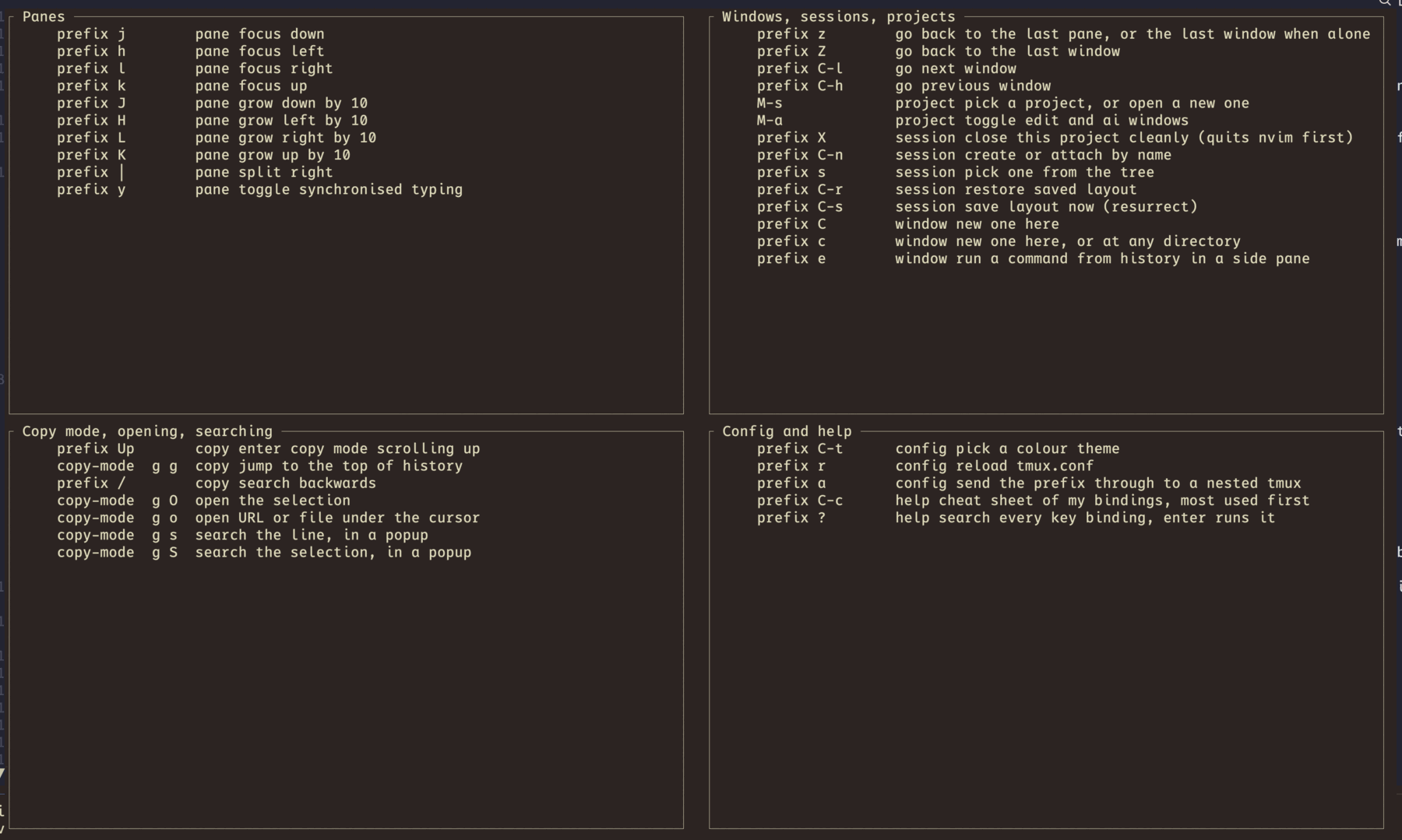
There are background tasks too, fetching my repositories so the ahead and behind counts mean something, reloading the config when it changes, naming windows after what’s running in them, and telling me a long command finished in a session I wasn’t looking at. All of it is off till a config line turns it on. A tool that starts talking to a remote or renaming your windows on its own is a worse neighbour than six shell scripts.
Plenty of plugins already do pieces of this, so before writing any of it I went and counted stars and last-push dates, because building a fifth version of somebody’s signature work is a rude way to spend a weekend.
tmux-resurrect and tmux-continuum are still the answer for crash recovery across a whole server, and my autosave shells out to resurrect’s own save script instead of reimplementing it.
Hint-based copy was on my list until I looked: tmux-fingers has 1,473 stars, tmux-thumbs is already Rust, and the only argument for a third one was that it would share a pattern table with open, which isn’t a reason, so open will ship a snippet that hands off to thumbs.
Nobody should read this as a story about writing less code either. The zsh was 1,495 lines. The Rust is 20,207 with another 1,375 in tests, and what I bought with the extra 20,000 is that it runs once instead of six times a second.
It’s macOS and Linux, MIT, and not Windows, since the whole thing is a unix socket and a SIGWINCH.
The pickers want tmux 3.2 for display-popup -E and the bar is happy on 3.0.
It won’t restore your sessions on its own: it saves them on a timer, and restoring stays on a key I press, cause an automatic restore would drop a stale layout over a session I’d already started working in.
A container to try it in Link to heading
Asking somebody to install a daemon to find out whether they want a daemon is a bad trade, so there’s an image.
docker run --rm -it ghcr.io/lonkar-org/tmux-companion:playgroundtmux, the binary, the config with every feature turned on, five fake projects and a guided tour through the bindings. Nothing is mounted from your machine and nothing leaves the container, and the whole thing goes away when you exit it.
The five projects sit in a different git state each, so the bar has something different to say in every one: orchard-api clean, orchard-web with three modified and one untracked, sparrow-cli staged and modified at once on a branch long enough to get truncated, lantern-docs on a detached HEAD, and anvil-infra two commits ahead of its upstream.
orchard-api/build.log holds a compiler error with a path, a line and a column in it, which is there for the copy-mode o binding to open.
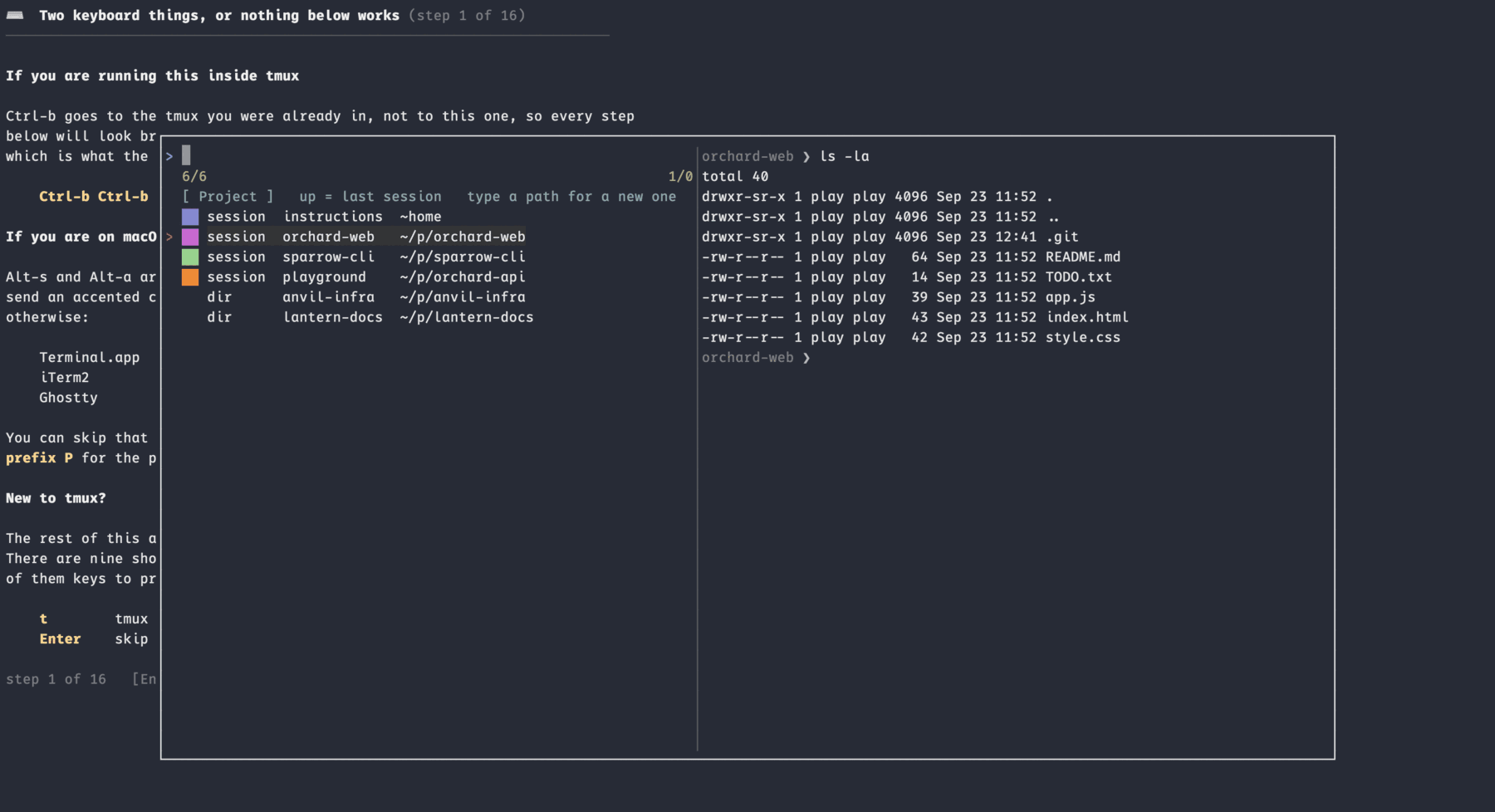
The tour is sixteen steps.
Each one says what to press, pins itself to a second status line so it’s still in front of you after you’ve switched sessions, and waits for Enter, and some steps check that the thing actually happened and say so when it didn’t.
s skips a step, q drops you into a shell, and tour starts it again.
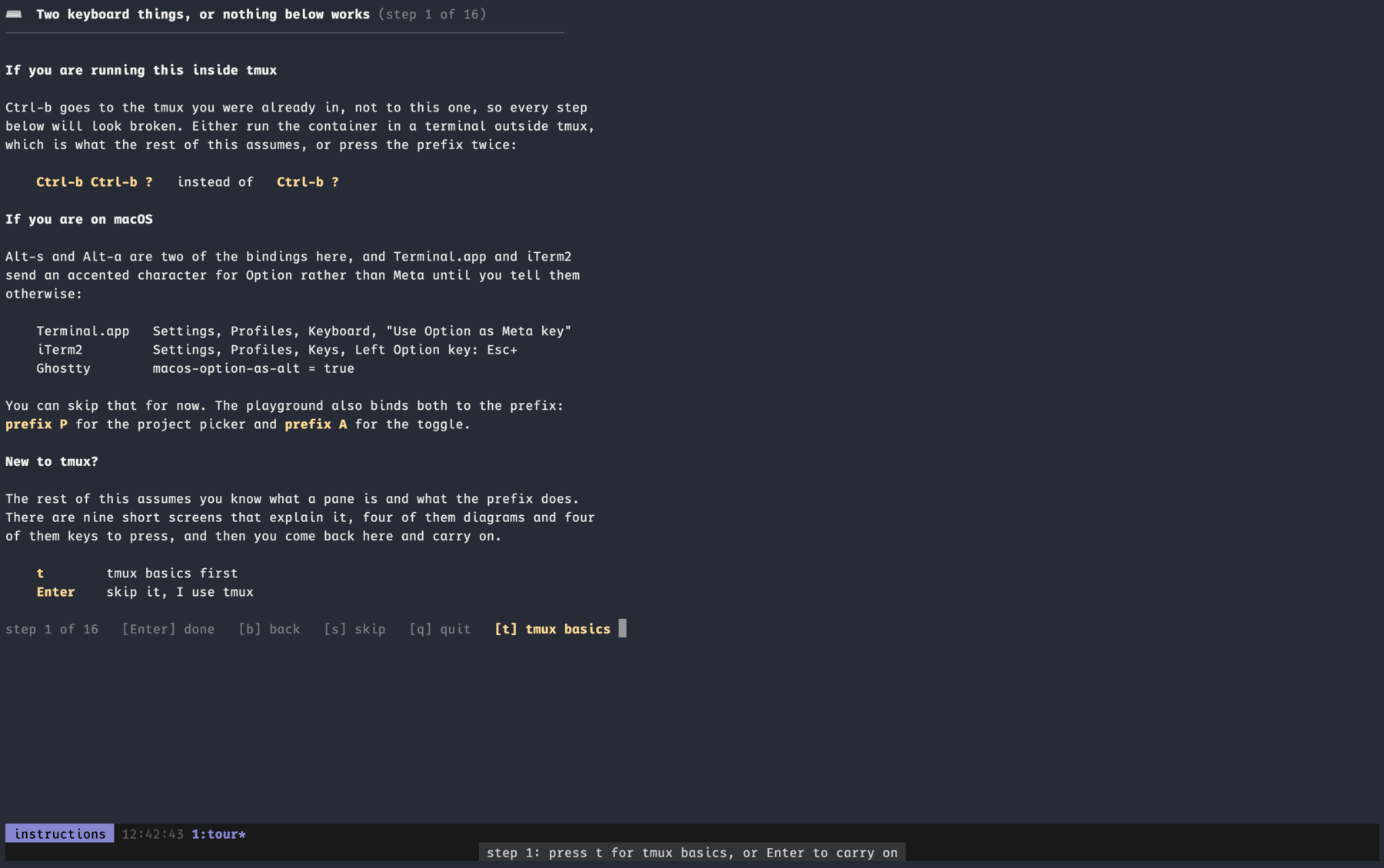
Step one offers a detour I hadn’t planned to write. Nine screens of tmux itself, what a server and a client are, what the prefix is for, how sessions and windows and panes nest, and what detaching actually does, with four diagrams and four screens of keys to press. Nothing in it is checked. It ends by pointing at learntmux.dev, which is 42 tasks against a real tmux in the browser and is better than anything I’d write, and then drops you back at step two. I stopped at those cause I did not wanted to build tmux tutorial but since the playground is in Docker anyone can use it, those who have never used tmux too. So I made these screen optional on first step for anyone interested to find basic concepts.
Glyphs are drawn by the terminal on your machine and not by anything in the container, so a Nerd Font has to be installed and picked there, and step two prints four of them so you find out in the first minute rather than the tenth.
If you start the container from inside tmux, Ctrl-b reaches the tmux you were already in and every binding in the tour looks broken, so run it from a terminal that isn’t in a session, or press the prefix twice.
A container has no battery, so that segment stays blank, and the network counters sit under the threshold the bandwidth segment draws at unless something’s transferring.
tmux-companion doctor inside the container says what it can and can’t see.
If you’ve got your own pile Link to heading
Go and measure it. ps will tell you what your status bar’s doing if you watch it for a minute, and the number’s usually worse than you’d guess, since the cost is in how many programs you start and not in what any of them computes.
You might find one #() call is all you needed.
I did.
The scripts didn’t stop either.
Through 21 and 22 September 2026 I gave every project its own session with a fixed colour and one key to toggle it, cached the key list so the cheat sheet on prefix+? opens without thinking about it, put a second cheat sheet on prefix+C-c ordered by what I press rather than alphabetically, and fixed the three bugs that made half my themes unreadable.
This recent burst in changes were caused by problem I faced while context switching multiple projects, previously whatever my work it always used to be connected somehow in larger work I was doing.
So even if stricter sense I was working multiple projects they were interconnected, now I work on multiple things that have nothing to do with each other and separating them in session does help me context switch better.
I found lot of existing tools but like always I first build my own cause it was simple, I knew what I wanted and if something was complicated I see if it’s worth switching to someone elses maintained tool.
The code is at lonkar-org/tmux-companion, MIT, macOS and Linux.